
microsoft, tips, tweaks
- 12:06 PM - 0 comments
Assign Windows XP Machine As NTP Server Within LAN
Reason to do this
We have come across customer sites where a Windows Server is not present and yet the customer wants all workstations and devices to be time-synchronised to help when analysing log files and ensuring all workstations are running the same time reference. The main Windows XP machine (hereinafter referred to as the source machine) is either synchronised to a separate NTP time source, or is corrected manually by checking/adjusting once a week.
How do I configure the source machine?
Whilst it is easy to make the source machine an NTP server for standard devices to synchronise with it, this does not qualify it as being authoritative to other Windows XP machines and an additional set of flags need to be suitably configured.
To simplify the configuration of your source machine, copy this code and save it to your notepad as ntp-server.reg
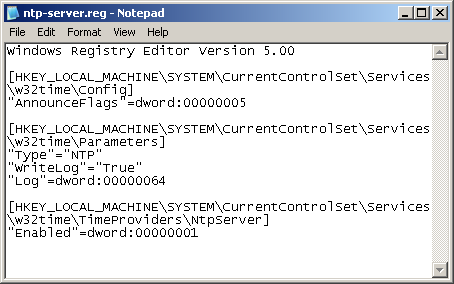
This modifies the registry of the source machine to:
* be an authoritative time source for Windows clients
* to use NTP rather than an Active Directory domain source
* to enable writing to the event log
* to log NTP activity
* to become an NTP server
Double-click on the registry file in order to allow regedit to update the machine's registry - you only do this to the source machine. You can now delete the registry file as it is no longer needed.
It only remains to cycle the Windows time service so that the source machine actually takes account of the changes. This will happen at the next reboot, or can be forced by dropping to a command prompt and typing:
How do I configure the clients machine?
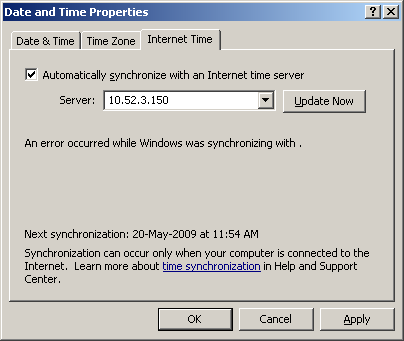
Now, go to your Windows clients machine, replace default time server (time.windows.com) with your new configured WinXP NTP server IP . In this case, i'm using my NTP server IP, which is 10.52.3.150, and then, click Update Now. Happy tweaking =D
We have come across customer sites where a Windows Server is not present and yet the customer wants all workstations and devices to be time-synchronised to help when analysing log files and ensuring all workstations are running the same time reference. The main Windows XP machine (hereinafter referred to as the source machine) is either synchronised to a separate NTP time source, or is corrected manually by checking/adjusting once a week.
How do I configure the source machine?
Whilst it is easy to make the source machine an NTP server for standard devices to synchronise with it, this does not qualify it as being authoritative to other Windows XP machines and an additional set of flags need to be suitably configured.
To simplify the configuration of your source machine, copy this code and save it to your notepad as ntp-server.reg
Windows Registry Editor Version 5.00
[HKEY_LOCAL_MACHINE\SYSTEM\CurrentControlSet\Services\w32time\Config]
"AnnounceFlags"=dword:00000005
[HKEY_LOCAL_MACHINE\SYSTEM\CurrentControlSet\Services\w32time\Parameters]
"Type"="NTP"
"WriteLog"="True"
"Log"=dword:00000064
[HKEY_LOCAL_MACHINE\SYSTEM\CurrentControlSet\Services\w32time\TimeProviders\NtpServer]
"Enabled"=dword:00000001
* be an authoritative time source for Windows clients
* to use NTP rather than an Active Directory domain source
* to enable writing to the event log
* to log NTP activity
* to become an NTP server
Double-click on the registry file in order to allow regedit to update the machine's registry - you only do this to the source machine. You can now delete the registry file as it is no longer needed.
It only remains to cycle the Windows time service so that the source machine actually takes account of the changes. This will happen at the next reboot, or can be forced by dropping to a command prompt and typing:
net stop w32time&&net start w32timeThat is all that is needed at the source machine. You should now have a fully functioning NTP server which is also authoritative for Windows clients.
How do I configure the clients machine?
Now, go to your Windows clients machine, replace default time server (time.windows.com) with your new configured WinXP NTP server IP . In this case, i'm using my NTP server IP, which is 10.52.3.150, and then, click Update Now. Happy tweaking =D









0 Responses to "Assign Windows XP Machine As NTP Server Within LAN"
Post a Comment